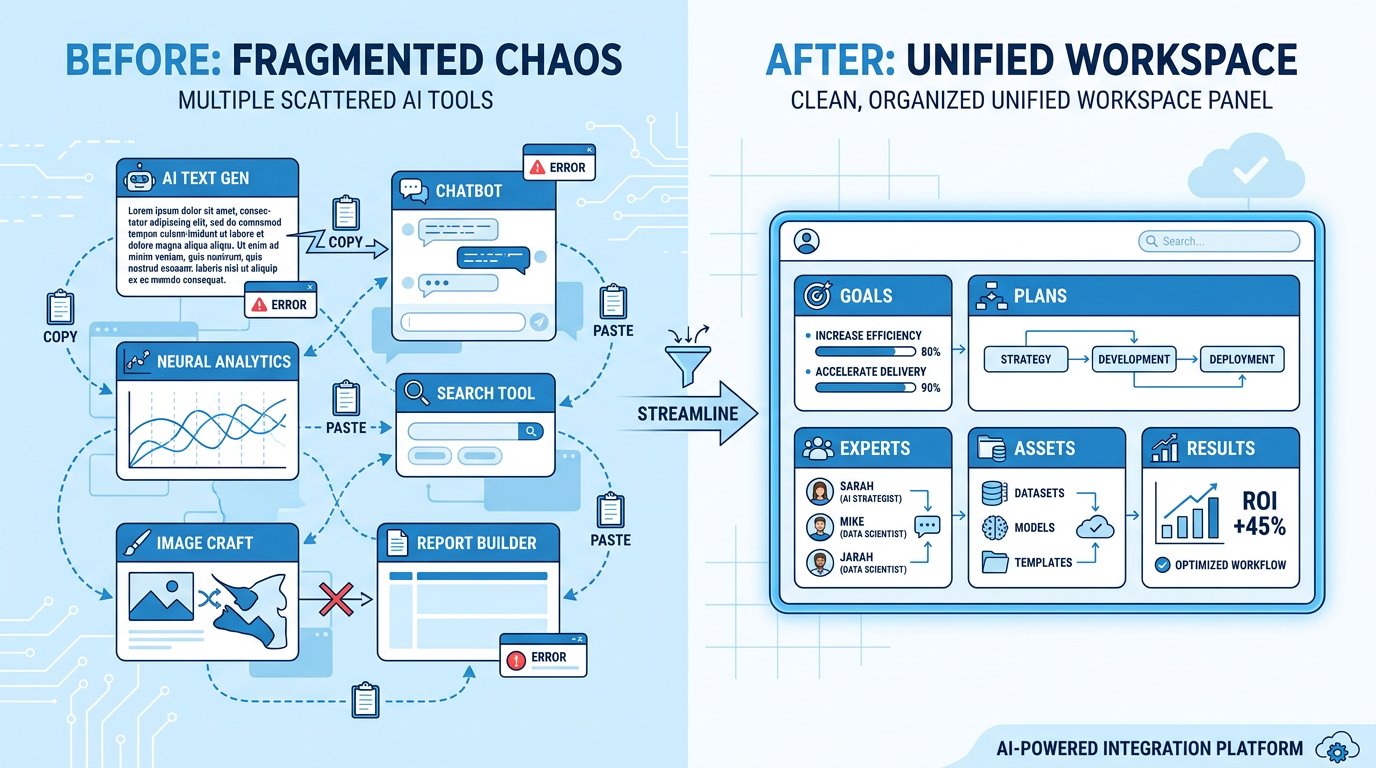
The average AI user now has too many tools: a chat assistant, a search assistant, an image generator, a video tool, a coding tool, a notes app, and a project folder full of downloads.
Each tool may be good. The work still breaks between them.
You write copy, then paste it into a deck. You generate an image, download it, upload it into a video tool, then rewrite captions somewhere else. You created a useful asset last week, but this week you cannot find it.
That is why the word “AI workspace” matters. But it is also why the word is becoming blurry. A true workspace is not just a place with many buttons. It is a place where work does not disappear.
First question: toolbox or workspace?
An all-in-one AI tool can be very useful. It may let you write docs, create images, make slides, generate video, or write code from one interface.
A workspace should go further. It should help you answer:
- What is the current goal?
- What outputs already exist?
- What can be edited next?
- Can last week’s assets be reused?
- Can this project continue without starting over?
If a product only gives you more tools, it is still a toolbox. If it keeps the work connected from idea to plan to execution to asset reuse, it becomes a workspace.
Wery: best for goal-to-deliverable work
Wery starts simply: tell Wery the goal.
That goal can be small:
- “Summarize this PDF into a one-page brief.”
- “Create four app icon directions.”
- “Turn these meeting notes into action items.”
- “Write five posts for X and LinkedIn.”
It can also be bigger:
- “Create a launch package for this product.”
- “Turn this research into an 8-slide deck.”
- “Create a one-week content plan and visual direction for this brand.”
- “Turn this video brief into scripts, storyboard, cover ideas, captions, and publishing copy.”
Wery’s value is not just the number of things it can generate. It is the way one goal becomes a visible run: plan, expert routing, parallel progress, and assets returning to the workspace.
Genspark: strong for exploring many AI capabilities in one place
Genspark describes itself as an all-in-one AI workspace for slides, docs, images, video, code, and design. That is compelling if you want to explore many AI capabilities in one interface.
Its strength is breadth. You can try many types of outputs quickly.
The tradeoff is that breadth does not automatically create continuity. If your goal is to experiment with different AI tools, Genspark can be a strong choice. If your goal is to keep a real project planned, divided, moving, and reusable, Wery is more focused on that experience.
ChatGPT Projects and Workspace Agents: strong for teams already in the OpenAI ecosystem
OpenAI’s Workspace Agents are designed for teams: shared agents, permissions, long-running workflows, and organization-controlled contexts.
If your company or school already lives in ChatGPT and needs shared agents inside organizational controls, this is a natural direction.
But individual creators, students, and solo operators often need something different: can I finish this task today, reduce switching, and keep the output for next time? That is where Wery feels closer to a consumer-facing AI studio.
OpenClaw and Hermes Agent: more like a personal AI OS
OpenClaw and Hermes Agent are exciting for technical users. They can be self-hosted, connected to messaging platforms, extended with skills, and run closer to your own environment.
But they are not the lightest entry point. You may need to manage Node, API keys, gateways, permissions, terminal commands, model costs, and skill quality.
If you enjoy building your own system, they are worth exploring. If you want to open a workspace and immediately move content, launch, visual, video, and document work forward, Wery asks less of you upfront.
Runway, LibTV, and LoveArt: powerful tools, not full workspaces
Runway, LibTV, and LoveArt-style products are strong in their creative lanes.
Runway is strong in video generation and scene consistency. LibTV focuses on professional AI video creation. LoveArt.ai and Lovart-style tools focus on brand visuals, design assets, packaging, and social creative.
These tools are valuable. But they usually solve one surface of the project. If you need one video, choose a video tool. If you need a full product launch from positioning to deck, copy, visuals, video, and social rollout, you need an organizing workspace.
What a useful AI workspace should include
| Standard | Why it matters | Wery’s experience |
|---|---|---|
| One entry | Users do not want to choose tools first | Give Wery the goal |
| Visible plan | Important work needs direction | Preview the execution plan |
| Specialist lanes | Different outputs need different capabilities | Experts move the right parts |
| Parallel progress | Waiting breaks momentum | Copy, visuals, docs, and video can move together |
| Asset continuity | Outputs should not disappear | Workspace and Assets keep results alive |
| Continued editing | Real work takes revision | Continue from the previous version |
| Everyday use | A workspace should not be only for huge projects | PDFs, posts, icons, notes, and launch packs all fit |
Who should use Wery as an AI workspace?
Young creators
You may need scripts, covers, posts, captions, and platform variants. Wery helps turn one idea into multiple publishable assets.
Students and knowledge workers
You may want notes, study cards, slides, and visual summaries from the same material. Wery helps turn information into outputs.
Solo founders
You may not have a full marketing, design, and content team. Wery can act like a lightweight virtual studio for landing pages, decks, launch posts, visuals, and videos.
Marketers and operators
You care about more than copy. You need rollout rhythm, channel versions, asset reuse, and continuity. Wery’s workspace structure fits that kind of work.
Final thought: the best workspace keeps work connected
AI does not lack generation. It lacks continuity.
When choosing an AI workspace, do not only ask how many features it has. Ask:
Will my work become more continuous here?
If you want to try scattered capabilities, an all-in-one tool can be useful. If you want AI to become part of your daily work and keep your outputs alive, Wery is built for that job.
Five real scenarios that reveal whether a workspace is actually useful
Scenario 1: research to deck
The normal workflow is fragmented: search, copy highlights, write notes, build slides, find visuals, adjust format. None of the steps is impossible. The context gets lost between them.
A real AI workspace should keep source material, structure, slide outline, visual direction, and final outputs inside the same project. Wery’s Research → Docs → Slides pattern is built for this kind of continuity.
Scenario 2: one idea to a week of content
Creators rarely suffer from having no ideas. They suffer from ideas not becoming consistent output. One topic may need short videos, posts, a newsletter angle, a thread, a livestream outline, and a follow-up.
If every asset starts from a fresh chat, the work becomes exhausting. A workspace lets one theme keep growing into multiple publishable pieces.
Scenario 3: old assets to a new version
Asset reuse is underrated. Last year’s logo, screenshots, visual style, and product description may still be useful. But if they are scattered across downloads, chats, and design files, you recreate work that already existed.
Wery’s Assets matter because previous outputs can enter new tasks. “Bring the logo from project B and make a younger launch visual” is a workspace task, not a one-off generation task.
Scenario 4: launch week control room
Launch week is full of small tasks: update page copy, make covers, rewrite FAQ, prepare comment replies, generate video titles, summarize user feedback.
A workspace should let those tasks stay attached to the same launch goal. Wery helps because one goal can branch into many deliverables without forcing you to open a separate chat for each one.
Scenario 5: recurring work
Some work repeats every week: unread email digest, trend research, content ideas, competitor updates, weekly summaries. For recurring work, the key is not a dazzling first output. It is stable repetition, pause/resume control, and reuse.
Wery’s Shortcut and recurring workflow direction fits this pattern: repeated work should not start from scratch every time.
How to move from scattered tools to an AI workspace
You do not need to replace everything in one day.
Start with one task you do every week and dislike repeating: weekly updates, content plans, research summaries, launch assets, client reports.
Then rewrite it as a goal instead of a command. Instead of “write a post,” say: “Prepare a publishable content pack for this topic, including titles, short video scripts, post structure, and publishing suggestions.”
Next, check whether the output can stay in one project and be continued. If not, it is a one-time generator. If yes, it starts behaving like a workspace.
Finally, bring old assets back into the process. The workspace becomes much more valuable when AI works from your existing product material, visuals, copy, screenshots, and past outputs.
The point is not having more features. The point is that the work no longer breaks.