
OpenAI introduced GPT-6.1 Terra on October 26, 2026, with a clear focus: stronger visual understanding, more reliable writing, and the ability to act on software interfaces when connected to the right tools. GPT-6.1 Terra is now available on Wery.AI, giving users another option for planning, analyzing, and refining creative work.
Terra is not an AI image or video generator. Its role is different: it helps interpret references, reason through instructions, and produce clearer briefs and prompts before production begins. Here is what changed, what the benchmarks actually mean, and how to start using the model.
What’s New in GPT-6.1 Terra?
Visual reasoning that goes beyond image recognition
Terra can analyze images and technical drawings, identify relationships between visual elements, and turn what it sees into structured descriptions. OpenAI reports stronger MMMU-Pro performance than GPT-5.6 Terra at every tested reasoning setting. For creators, the practical opportunity is to inspect a storyboard, break down a reference image’s composition, or generate precise art-direction notes from visual material.
More capable computer use — with the right tools
Computer use is the ability to interpret screens and carry out steps inside applications. OpenAI reports substantial gains on OSWorld 2.1, an evaluation of multistep desktop tasks. It also says that, at medium reasoning effort, Terra completes certain professional computer-based tasks more than three times faster than GPT-6 Astra or GPT-6.1 Sol.
This is a model capability, not a promise that every Terra interface can autonomously operate your computer. Access to applications, file uploads, and other actions depends on the tools and permissions a platform has enabled.
Clearer writing, fewer factual errors, stronger coding
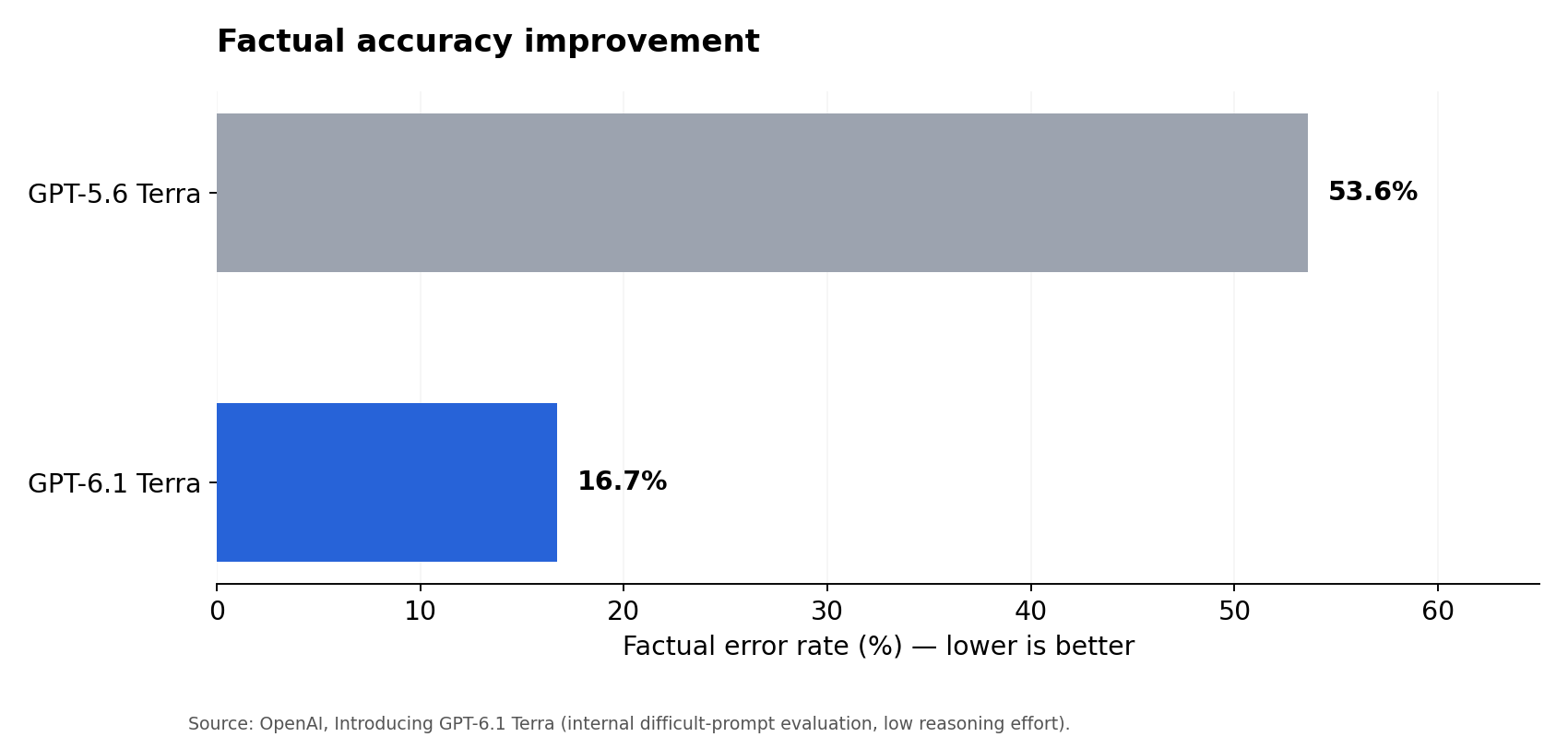
Terra is designed for drafting and revision as well as visual analysis. In OpenAI’s internal difficult-prompt evaluation, the factual error rate at low reasoning effort dropped from 53.6% with GPT-5.6 Terra to 16.7% with GPT-6.1 Terra. The results are encouraging, but factual claims still require checking.
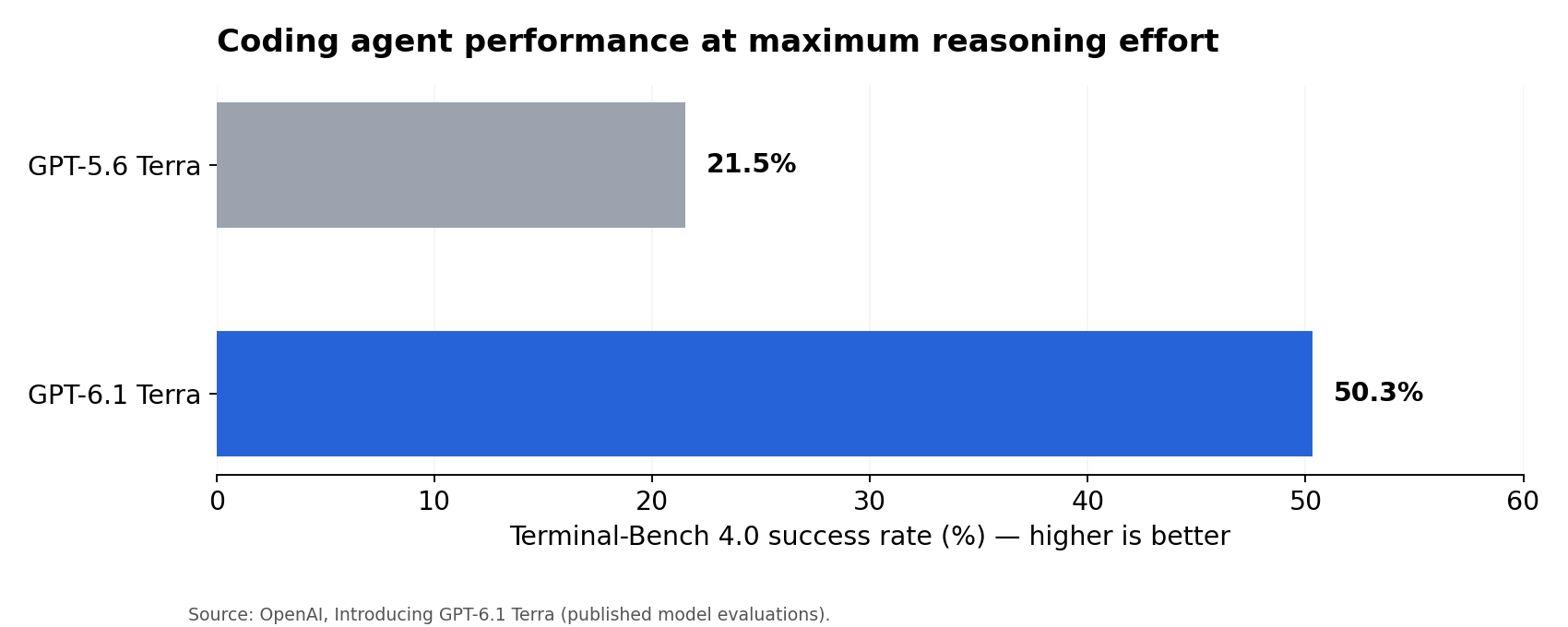
In coding, OpenAI reports a 50.3% success rate on Terminal-Bench 4.0 at maximum reasoning effort, compared with 21.5% for the previous Terra model. For particularly difficult software-engineering work, OpenAI still recommends stronger models such as GPT-6.1 Sol or GPT-6 Astra.
GPT-6.1 Terra Benchmarks: What Improved?
Official benchmark data: Terminal-Bench 4.0
One other number worth knowing is cost: OpenAI says Terra’s standard API prices are 50% lower than those of GPT-5.6 Terra. Its listed rates are $1 per million input tokens and $5 per million output tokens. These are developer API rates, not Wery.AI consumer pricing. The model also supports a 1,050,000-token context window, according to the API documentation.
Three Creative Ways to Use GPT-6.1 Terra
1. Turn a rough video idea into a production-ready prompt
Start with an idea, then ask Terra to specify the scene, subject motion, camera direction, and lighting while preserving a clear sequence of actions.
Try this prompt: “Turn this concept into a single continuous 10-second AI video prompt: a traveler steps onto an empty platform as a train arrives in heavy rain. Specify camera movement, timing, realistic physics, lighting and background detail. Avoid scene cuts and contradictory actions.”
2. Analyze a visual reference before creating something new
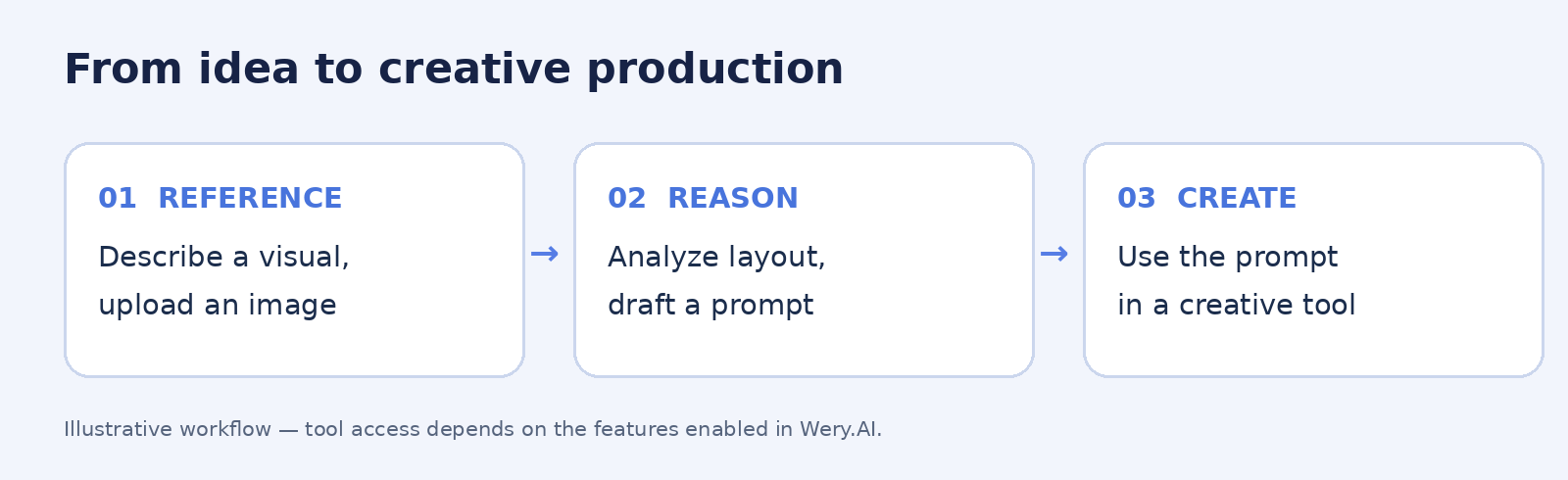
If image input is enabled in your Wery.AI Terra interface, provide a reference image and ask for a breakdown of composition, focal point, lighting, palette, and materials. Then request a concise prompt that translates those observations into directions for an image-generation model.
Try this prompt: “Analyze this image as an art director. Identify the camera angle, composition, lighting sources, colors, and material textures. Then write a reusable image-generation prompt that keeps the same visual language without copying the exact subject.”
3. Build a content brief from scattered notes
Terra can organize campaign notes, audience insights, or rough scripts into a usable production plan. Ask it to identify missing assumptions rather than confidently inventing details.
Try this prompt: “Using the notes below, create a concise creative brief with audience, key message, three visual directions, deliverables, and a production checklist. Flag any missing information separately. Do not invent research findings.”
How to Try GPT-6.1 Terra on Wery.AI
Visit Wery.AI, select GPT-6.1 Terra from the AI model menu, and enter your request. Start with one of the prompts above to analyze references, organize a creative brief, or refine image and video prompts, then adjust your instructions based on the response.