
Need a Halloween post without assembling a costume, booking a shoot or learning video editing? AI Halloween templates can turn a familiar portrait into a dressed-up character, an eerie moving photograph or a dramatic reveal.
The seven Wery.ai effects below cover both still images and short videos. Each template is presented with a preview, best-use case, description and direct link.
7 AI Halloween templates to try
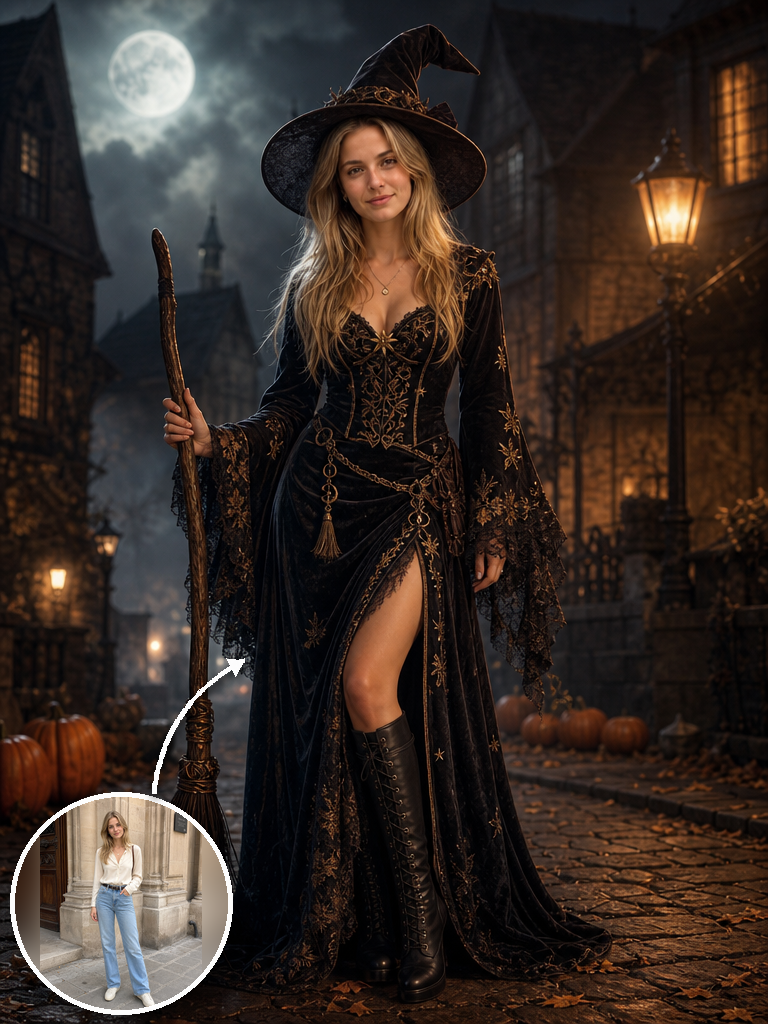
Best for AI Halloween portraits and costume ideas
Halloween Costume Generator
Turn a clear portrait into a polished Halloween fashion image without losing the person’s identity. The template builds the outfit, makeup, accessories, lighting and setting around the photo. The result feels like a styled campaign portrait, so it works especially well for profile images, invitations and polished seasonal posts.
Use this templateBest for before-and-after Halloween transformation videos
Halloween Costume Reveal
This short-video template stages a costume change through a single full-body turn, creating a compact reveal for a Reel, TikTok or short social post. The turn gives the clip a crisp before-and-after beat that feels energetic even in a few seconds.
Use this templateBest for creepy photo animations and subtle horror
Haunted Photo
A framed photograph sits in an ordinary setting until something unsettling begins to happen. The slow, uncanny change creates tension without relying on a loud jump scare. Because the disturbance builds slowly, it works beautifully for eerie story posts, mystery teasers and understated horror.
Use this templateBest for cute Halloween characters and playful social clips
My Own Figurine
Meet a miniature witch version of yourself. The tiny character sits on your palm, comes to life, waves and casts a small spell while the full-size person stays in frame. The playful scale shift makes the clip feel charming and surprising, ideal for lighthearted Halloween posts or character reveals.
Use this templateBest for cinematic witch transformation videos
Witch Transform
A glowing portal, smoke, magical energy and a moving cape push this costume reveal in a more fantastical direction, making the transformation itself the main attraction. The effects arrive in a cinematic crescendo, giving fantasy edits, costume reveals and dramatic intros a true spell-casting moment.
Use this templateBest for gothic vampire edits and close-up reveals
Vampire Transform
Red energy, pale skin, white hair, luminous eyes, subtle fangs and a dark high-collared coat create a dramatic supernatural makeover. The color shift and close-up details make the final reveal feel sleek, gothic and ready for a dramatic profile clip.
Use this templateBest for monster transformations and bold Halloween visuals
Pumpkin Head Transform
A human head becomes a carved pumpkin lit from within, while flames and straw push the scene toward creature horror and a strong Halloween silhouette. Its oversized glowing silhouette is instantly readable on a small screen, making it a strong scroll-stopper for bold seasonal posts.
Use this templateWhich Halloween AI template should you choose?
For a polished profile photo or invitation visual, start with Halloween Costume Generator. For a quick outfit transition, use Halloween Costume Reveal. Haunted Photo is strongest for eerie storytelling, while My Own Figurine is lighter and more playful.
For a dramatic transformation, choose Witch Transform or Vampire Transform. Pumpkin Head Transform makes the biggest departure from the original portrait and works best for a bold creature-style visual.
How to create Halloween photos and videos with Wery.ai
- Choose the template that matches your format and mood.
- Upload a clear reference image that fits the framing of the chosen effect.
- Review the template inputs and adjust any available settings to match your idea.
- Generate the image or video and review the result for consistency.
- Download the finished result, then publish or share it.
Create your Halloween look on Wery.ai
From a fashion-style witch portrait to a haunted family photo or a vampire reveal, start with one image and choose the Halloween mood that suits your feed.
Explore Wery.ai and start creating