
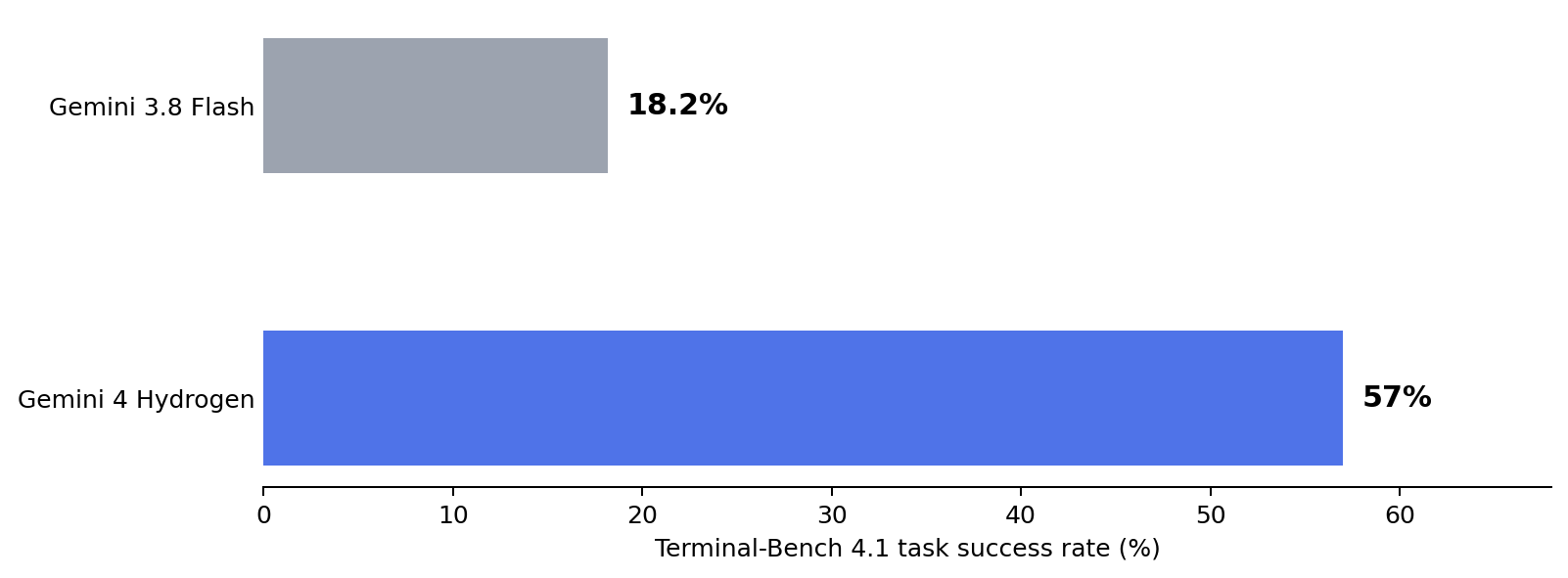
Google released Gemini 4 Hydrogen on November 12, 2026. Rather than focusing solely on deeper reasoning, the model emphasizes getting everyday coding, research, tool use, and ongoing revisions done quickly. Google says it completes tasks at around 2.5 times the speed of Gemini 3.8 Flash under specified test conditions, with its Terminal-Bench 4.1 score rising from 18.2% to 57%. The focus is on completing multistep tasks involving file reading, search, coding, and tool calls more quickly.
This guide covers where Gemini 4 Hydrogen fits, its key features, performance, API pricing, and access options, and compares the tasks best suited to Gemini Flash and Argon.
What Is Gemini 4 Hydrogen?
Gemini 4 Hydrogen is the Gemini 4 model built for fast execution and agent workflows. It can handle tasks on its own or work alongside Gemini 4 Carbon and Gemini 4 Argon, which focus more on complex, extended reasoning. An agent workflow does not mean the model can act autonomously without limits: once given tools, files, and permission, it can search, read, write code, verify its work, and make further changes step by step.
| Key specification | Gemini 4 Hydrogen |
|---|---|
| Model ID | gemini-4-hydrogen |
| Input | Text, images, audio, video, and PDFs |
| API output | Text; not a native image or video generation model |
| Context | A unified window of approximately 1 million tokens |
| Thinking levels | low / medium / high (default) / xhigh |
| Main official access options | Gemini app, Google AI Studio, Gemini API, and selected Antigravity access points |
What Are the Main Upgrades in Gemini 4 Hydrogen?
1. Faster Multistep Execution, Beyond Faster Answers
Google's published results show that, under its test conditions, Hydrogen at the default high setting completes tasks at around 2.5 times the speed of Gemini 3.8 Flash. For workflows that involve frequent searches, revisions, and retries, that improvement can reduce the time spent waiting between steps.
2. Multimodal Input for Turning Source Material into Deliverables
Hydrogen can analyze PDFs, charts, spreadsheets, recordings, and video together. Google reports a score of 53.4% on the Multimodal Knowledge Agent (MKA) benchmark. MKA measures overall performance on knowledge work across different modalities, including understanding source material and producing deliverables.
3. Orchestrator: Dividing Work Across Models
Google introduced Orchestrator in Antigravity to coordinate models such as Carbon and Hydrogen within a single session. Carbon might make architectural decisions while Hydrogen handles code changes and testing, for example. Google says that in one set of Terminal-Bench 4.0 tests, the combination came close to Carbon's success rate when used alone, while consuming 24% less quota on average and completing tasks 19% faster. Orchestrator illustrates how different models can share the work.
4. Choose the Thinking Level for the Task
Hydrogen offers four thinking levels: low, medium, high, and xhigh. For formatting and simple rewrites, start by trying a lower setting; for checking multiple files, complex coding, and repeated tool use, high is a reasonable starting point. xhigh is not the most cost-effective option for every task: more thinking generally means more waiting and higher usage.
Hydrogen, Flash, or Argon: Which Should You Choose?
| Model | Tasks to try | What to consider |
|---|---|---|
| Gemini 3.8 Flash | Existing high-volume tasks and lightweight workflows | Compare speed and cost with Hydrogen on lightweight tasks |
| Gemini 4 Hydrogen | Tool use, rapid iteration, and document or code delivery | Suited to repeated execution and multistep tool use |
| Gemini 4 Argon | Difficult tasks requiring extended reasoning | Focused on complex reasoning tasks |
Google reports Artificial Analysis Intelligence Index scores of 51 for Hydrogen high, 54 for Hydrogen xhigh, and 50 for Argon. On this measure, Hydrogen shows capabilities close to Argon's, although the two models still have different primary roles.
Gemini 4 Hydrogen Pricing and Free Access
At the standard paid Gemini API rates published by Google, Hydrogen costs approximately US$1.50 per million input tokens and US$7.50 per million output tokens, including billable thinking tokens. These rates apply across its full context window.
| Item | Standard price |
|---|---|
| Uncached input / 1 million tokens | US$1.50 |
| Output and thinking / 1 million tokens | US$7.50 |
| Input served from implicit cache / 1 million tokens | US$0.075 |
For example, 20,000 uncached input tokens plus 5,000 billable output or thinking tokens would cost an estimated 0.02 × 1.50 + 0.005 × 7.50 = US$0.0675. Some tool services carry separate charges.
Free users of the Gemini app may access Hydrogen through automatic model selection. The free tiers in AI Studio and the API also have access and rate limits. A paid Gemini app subscription does not include API credits; free allowances and access permissions vary by product.
How to Use Gemini 4 Hydrogen
For everyday use, open the Gemini app and check the available models or automatic model selection information. To choose the model explicitly and adjust its thinking level, try Google AI Studio. Developers can specify the model ID gemini-4-hydrogen in the Gemini API and follow the official quickstart to configure request parameters.
Official access: Gemini app · Google AI Studio · Google Gemini API documentation
To get started, upload a PDF, give the model a coding task, or let it use available tools to complete a multistep operation. These are ways to explore its long context window and agent execution capabilities.
Explore More AI Models on Wery.AI
Gemini 4 Hydrogen is primarily designed for text generation, source analysis, coding, and tool use. To explore AI image and video generation as well, visit Wery.AI's models and creative tools.
Learn more: Visit Wery.AI
Gemini 4 Hydrogen FAQ
Is Gemini 4 Hydrogen Free?
Limited free access is available. Allowances and access methods vary by product.
Can Gemini 4 Hydrogen Generate Images or Videos Directly?
Hydrogen's API output is primarily text. It can understand images, audio, and video, but generating media files requires other generation models or tools.
Is Gemini 4 Hydrogen More Capable Than Argon?
They serve different roles. Hydrogen emphasizes tool execution and speed, while Argon focuses on complex, extended reasoning.
Does a 1-Million-Token Context Guarantee Accurate Understanding of Everything?
The context window describes how much material the model can process. It does not directly determine how accurately it understands or reasons about that material.
Who Is Gemini 4 Hydrogen Best Suited To?
Gemini 4 Hydrogen stands out for speed and multistep execution. Developers can use it for code changes and tool calls; researchers and office users can organize multimodal material with its long context window; and everyday users can experience faster handling of complex tasks in Gemini products. Looking at pricing, access options, and task requirements, rather than ranking scores alone, provides a better basis for deciding whether it fits your workflow.